In this article I am going to talk about basic multi-threaded client-server application. We will create and observe behavior using blocking IO (OIO) and after that We will create similar application using NIO and observe the behavior and performance impacts.
1) Blocking IO multi-threaded client and server program
Server Code:
Let me explain what is happening in this program:
1) we are creating a thread pool of fixed size 5. As this is server you have to manage resources so you can not create infinite threads or cached thread pool which keeps on creating threads. Else the server will be out of processing and memory resources.For this example I have kept the count very low but in real life it could be much higher.
2) In the main thread we are running an infinite while loop which accepts a connection from client , once the client connection received it submits the handling of that connection to a thread .
3) As we have 5 threads only for processing actual requests , at a time only 5 client connections will be handled. If client request come and thread pool has no free thread than it queues up that thread. When ever any thread become free in thread pool the queued task will be assigned to that thread.
4) In the client handling thread , first we are expecting client name from client . Second we are sending acknowledgement back to the client. Third we are again expecting some data from client to be processed by server. Than we just sysout that data in server.
5) clientDataStream.readLine() is a blocking operation and that method call remains blocked till the time some data is received from client. The processing thread remains occupied till the time that method call is not over.
Client Code:
What we are doing here is:
1) In the main thread we are creating 10 client threads and submit them for processing.
2) Each client thread First connecting to server. Than sending its name to server. After that it expects response from server. Than it is sleeping for 15 seconds and after that sending some data to server for processing. Than the thread is over. It will close the socket and come out of execution.
3) As we have seen that ,At a time server can handle 5 threads only and here each client thread has 15 second sleep inside the client server communication. So each thread in the server code which handles client communication will take minimum 15 seconds or more to become free and available for processing some new client request.
Client outcome:

As you can see after getting acknowledgement from first 5 threads it will take long pause because the remaining 5 threads submitted for execution but server has no threads available for processing that next 5 connection as it is busy handling the first 5 connection request from client.
Server outcome:

As you can see when server receives first 5 connection from client it prints the client name and send acknowledgement to client and after that each server thread waits for client to send some data for processing , but client takes 15 seconds delay to send that data so all server threads remains in blocked state and no new client connection request will be accepted , all of the rest connection request threads will be queued up for processing. Once each processing threads receives response from client they are processing it and those threads will be available for queued connection request. Once all queued request filled up thread-pool again than all of them remains in blocked state till the time they receive processing data from client.
Above lines from server code makes the threads block as client will send data after 15 seconds delay.
Now Lets see similar client server interaction with NIO using Netty framework.
I will keep all the parameters like thread pool size , sleep time exactly same as OIO program.
2) NIO multi-threaded client and server program using Netty
If you are new to Netty please read my previous article in which I gave basic introduction related to Netty.
http://techxperiment.blogspot.in/2016/09/demonstration-of-basic-difference.html
Server Code:
What we are doing here:
1) creating 1 thread which accepts the client connections and 5 threads which can actually process that request. Which is exactly same as OIO server code.
2)MyServerChannelHandler handles the client request exactly in similar way of OIO server program. I wrote comments to make it clear the response flow of server.
Client Code:
Here we are doing:
1) creating 10 threads which will try to connect to server and interact.
2) each thread once connected , first sends its name to client. Second sleep for 15 seconds , after that it sends data for processing to server.
3) MyClientChannelHandler will simply prints what ever response received from server.
Lets see the outcome of this program:
Client outcome:

Here we can see that all 10 clients get connected and received acknowledgement from server without any delay even though server has only 5 threads to process connections.
I will explain the reason very soon.
Server outcome:

As you can see even though server has 5 threads only to handle client connection ,still it allows 10 client connection at a time. After that a long pause , as all client takes 15 seconds delay to send processing data . The key thing is server threads are not blocked and do not wait for any data from client. They will process it once it is available and mean while they can handle other client connections. This is the key aspect of NIO performance benefit over OIO.
Above method does not block server threads and do not wait for any data from client. It will be asynchronously called when ever any data is available from client. Till that time it can utilize the same server threads for some completely different client connections.
In this article I have talked about NIO benefit on server side but similar thing you can think for client side also.
Now imagine a scenario of client server application where there are thousands of client concurrently accessing server and both of them have chain of operations like reading data from user, writing data in DB, calculate some business logic. Imagine if all the time server and client threads remains blocked than client can see significant delay in response from server and can not resume some other work till the time it receives outcome from response while on server side even though threads are idle and waiting for some data from client so they can not be utilized for other clients.
NIO is must and extremely powerful tool for high performance network applications.
I hope I am correctly able to make my point in this article.
Please post your comments and doubts!!!
1) Blocking IO multi-threaded client and server program
Server Code:
 import io.netty.util.concurrent.DefaultThreadFactory;
  import java.io.BufferedReader;
  import java.io.IOException;
  import java.io.InputStreamReader;
  import java.io.PrintWriter;
  import java.net.ServerSocket;
  import java.net.Socket;
  import java.util.concurrent.ExecutorService;
  import java.util.concurrent.Executors;

  public class OioServer {
   public static void main(String... args) throws IOException {
    ExecutorService threadPool = Executors.newFixedThreadPool(5, new DefaultThreadFactory("serverpool"));
    try (ServerSocket listener = new ServerSocket(6689)) {
     while (true) {
      // this statement remains blocked till the time any new connection request is received from client
      Socket socket = listener.accept();
      threadPool.execute(new MyServerThread(socket));
     }
    }
   }
   private static class MyServerThread implements Runnable {
    private final Socket socket;

    private MyServerThread(Socket socket) {
     this.socket = socket;
    }
    public void run() {
     try {
      socket.setKeepAlive(true);
      BufferedReader clientDataStream = new BufferedReader(new InputStreamReader(socket.getInputStream()));
      PrintWriter out = new PrintWriter(socket.getOutputStream(), true);
      // first message from client is client name
      String clientName = clientDataStream.readLine();
      //sending back acknowledgement to client
      out.println(clientName + " connected");
      System.out.println(clientName + " connected");
      // second message from client is dummy data to process by server
      System.out.println(clientDataStream.readLine() + " Processed by server");
     } catch (IOException e) {
      e.printStackTrace();
     } finally {
      try {
       socket.close();
      } catch (IOException e) {
       e.printStackTrace();
      }
     }
    }
   }
  }
Let me explain what is happening in this program:
1) we are creating a thread pool of fixed size 5. As this is server you have to manage resources so you can not create infinite threads or cached thread pool which keeps on creating threads. Else the server will be out of processing and memory resources.For this example I have kept the count very low but in real life it could be much higher.
2) In the main thread we are running an infinite while loop which accepts a connection from client , once the client connection received it submits the handling of that connection to a thread .
3) As we have 5 threads only for processing actual requests , at a time only 5 client connections will be handled. If client request come and thread pool has no free thread than it queues up that thread. When ever any thread become free in thread pool the queued task will be assigned to that thread.
4) In the client handling thread , first we are expecting client name from client . Second we are sending acknowledgement back to the client. Third we are again expecting some data from client to be processed by server. Than we just sysout that data in server.
5) clientDataStream.readLine() is a blocking operation and that method call remains blocked till the time some data is received from client. The processing thread remains occupied till the time that method call is not over.
Client Code:
 import io.netty.util.concurrent.DefaultThreadFactory;
  import java.io.BufferedReader;
  import java.io.IOException;
  import java.io.InputStreamReader;
  import java.io.PrintWriter;
  import java.net.Socket;
  import java.util.concurrent.ExecutorService;
  import java.util.concurrent.Executors;

  public class OioClient {
   public static void main(String... args) throws IOException, InterruptedException {
    int count = 1;
    ExecutorService threadPool = Executors.newCachedThreadPool(new DefaultThreadFactory("clientpool"));
    while (true) {
     threadPool.execute(new MyClientThread(count));
     if (++count > 10) break;
     Thread.sleep(500); // just to make sure ordering

    }
   }

   private static class MyClientThread implements Runnable {
    private final int number;

    private MyClientThread(int number) {
     this.number = number;
    }
    public void run() {
     Socket s = null;
     try {
      //trying to connect to server
      s = new Socket("localhost", 6689);
      s.setKeepAlive(true);
      BufferedReader serverDataStream = new BufferedReader(new InputStreamReader(s.getInputStream()));
      PrintWriter out = new PrintWriter(s.getOutputStream(), true);
      //sending client name to server
      out.println("client" + number);
      //receive response from server
      System.out.println(serverDataStream.readLine());
      // sleep for 15 seconds
      Thread.sleep(15000L);
      //send some data to server for processing
      out.println("client" + number + " Data");
     } catch (Exception e) {
      System.out.println("In the Exception for Client " + number);
      e.printStackTrace();
     } finally {
      try {
       if (s != null) {
        s.close();
       }
      } catch (IOException e) {
       e.printStackTrace();
      }
     }
    }

   }
  }
What we are doing here is:
1) In the main thread we are creating 10 client threads and submit them for processing.
2) Each client thread First connecting to server. Than sending its name to server. After that it expects response from server. Than it is sleeping for 15 seconds and after that sending some data to server for processing. Than the thread is over. It will close the socket and come out of execution.
3) As we have seen that ,At a time server can handle 5 threads only and here each client thread has 15 second sleep inside the client server communication. So each thread in the server code which handles client communication will take minimum 15 seconds or more to become free and available for processing some new client request.
Client outcome:

As you can see after getting acknowledgement from first 5 threads it will take long pause because the remaining 5 threads submitted for execution but server has no threads available for processing that next 5 connection as it is busy handling the first 5 connection request from client.
Server outcome:
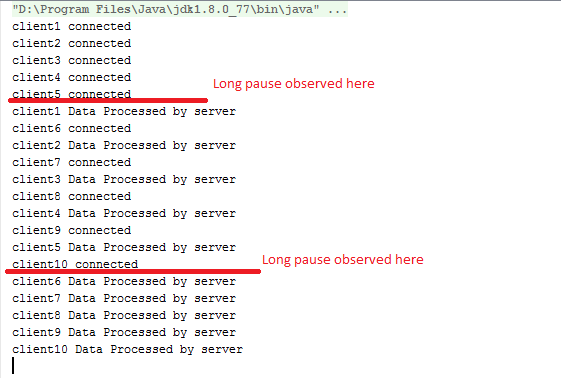
As you can see when server receives first 5 connection from client it prints the client name and send acknowledgement to client and after that each server thread waits for client to send some data for processing , but client takes 15 seconds delay to send that data so all server threads remains in blocked state and no new client connection request will be accepted , all of the rest connection request threads will be queued up for processing. Once each processing threads receives response from client they are processing it and those threads will be available for queued connection request. Once all queued request filled up thread-pool again than all of them remains in blocked state till the time they receive processing data from client.
  // second message from client is dummy data to process by server
     System.out.println(clientDataStream.readLine() + " Processed by server");
Above lines from server code makes the threads block as client will send data after 15 seconds delay.
Now Lets see similar client server interaction with NIO using Netty framework.
I will keep all the parameters like thread pool size , sleep time exactly same as OIO program.
2) NIO multi-threaded client and server program using Netty
If you are new to Netty please read my previous article in which I gave basic introduction related to Netty.
http://techxperiment.blogspot.in/2016/09/demonstration-of-basic-difference.html
Server Code:
 import io.netty.bootstrap.ServerBootstrap;
  import io.netty.channel.*;
  import io.netty.channel.nio.NioEventLoopGroup;
  import io.netty.channel.socket.SocketChannel;
  import io.netty.channel.socket.nio.NioServerSocketChannel;
  import io.netty.handler.codec.LineBasedFrameDecoder;
  import io.netty.handler.codec.string.StringDecoder;
  import io.netty.handler.codec.string.StringEncoder;
  import io.netty.util.concurrent.DefaultThreadFactory;


  public class NioServer {
   public static void main(String... args) throws InterruptedException {
    EventLoopGroup bossGroup = new NioEventLoopGroup(1); // 1 thread to accept connections
    //5 threads to process the connections
    EventLoopGroup workerGroup = new NioEventLoopGroup(5, new DefaultThreadFactory("serverpool"));
    try {
     ServerBootstrap b = new ServerBootstrap();
     b.group(bossGroup, workerGroup)
       .channel(NioServerSocketChannel.class)
       .childHandler(new ChannelInitializer<SocketChannel>() {
        @Override
        public void initChannel(SocketChannel ch) throws Exception {
         ch.pipeline().addLast(new LineBasedFrameDecoder(50));
         ch.pipeline().addLast(new StringDecoder());
         ch.pipeline().addLast(new StringEncoder());

         ch.pipeline().addLast(new MyServerChannelHandler());
        }
       })
       .childOption(ChannelOption.SO_KEEPALIVE, true);
     // Bind and start to accept incoming connections on port 8881.
     ChannelFuture f = b.bind(8881).sync();
     f.addListener(channelFuture -> {
      if (channelFuture.isSuccess()) {
       System.out.println("Server started...");
      } else {
       System.out.println(channelFuture.cause());
      }
     });
     f.channel().closeFuture().sync();
    } finally {
     workerGroup.shutdownGracefully();
     bossGroup.shutdownGracefully();
    }
   }

   private static class MyServerChannelHandler extends SimpleChannelInboundHandler<String> {
    @Override
    public void channelRead0(ChannelHandlerContext ctx, String msg) throws Exception {
     if (!msg.contains("Data")) { // if client sends its name
      System.out.println(msg + " connected"); // print on console
      ctx.writeAndFlush(msg + " connected" + "\n"); //sending back acknowledgement to client
     } else { // if client sends some data for processing
      System.out.println(msg + " Processed by server"); // print on console
     }
    }
   }
  }
What we are doing here:
1) creating 1 thread which accepts the client connections and 5 threads which can actually process that request. Which is exactly same as OIO server code.
2)MyServerChannelHandler handles the client request exactly in similar way of OIO server program. I wrote comments to make it clear the response flow of server.
Client Code:
 import io.netty.bootstrap.Bootstrap;
  import io.netty.channel.*;
  import io.netty.channel.nio.NioEventLoopGroup;
  import io.netty.channel.socket.SocketChannel;
  import io.netty.channel.socket.nio.NioSocketChannel;
  import io.netty.handler.codec.LineBasedFrameDecoder;
  import io.netty.handler.codec.string.StringDecoder;
  import io.netty.handler.codec.string.StringEncoder;
  import io.netty.util.concurrent.DefaultThreadFactory;
  import io.netty.util.concurrent.GenericFutureListener;
  import java.util.concurrent.ExecutorService;
  import java.util.concurrent.Executors;

  public class NioClient {
   public static void main(String... args) throws InterruptedException {
    int count = 1;
    ExecutorService threadPool = Executors.newCachedThreadPool(new DefaultThreadFactory("clientpool"));
    while (true) {
     threadPool.execute(new MyClientThread(count));
     if (++count > 10) break;
     Thread.sleep(500); // just to make sure ordering
    }
   }

   private static class MyClientThread implements Runnable {
    private final int number;

    private MyClientThread(int number) {
     this.number = number;
    }
    @Override
    public void run() {
     EventLoopGroup workerGroup = new NioEventLoopGroup(1);
     try {
      Bootstrap b = new Bootstrap();
      b.group(workerGroup);
      b.channel(NioSocketChannel.class);
      b.option(ChannelOption.SO_KEEPALIVE, true);
      b.handler(new ChannelInitializer<SocketChannel>() {
       @Override
       public void initChannel(SocketChannel ch) throws Exception {
        ch.pipeline().addLast(new LineBasedFrameDecoder(50));
        ch.pipeline().addLast(new StringDecoder());
        ch.pipeline().addLast(new StringEncoder());
        ch.pipeline().addLast(new MyClientChannelHandler());
       }
      });
      ChannelFuture f = null;
      try {
       //Trying to connect to server
       f = b.connect("localhost", 8881).sync();
      } catch (InterruptedException e) {
       e.printStackTrace();
      }
      f.addListener(new GenericFutureListener<ChannelFuture>() {
       public void operationComplete(ChannelFuture channelFuture) throws Exception {
        if (channelFuture.isSuccess()) {
         // any logger statements when client connected to server
        } else {
         System.out.println(channelFuture.cause());
        }
       }
      });
      //sending client name to server
      f.channel().writeAndFlush("client" + number + "\n");
      // sleep for 15 seconds
      Thread.sleep(15000);
      //send some data to server for processing
      f.channel().writeAndFlush("client" + number + " Data" + "\n");

      // Wait until the connection is closed.
      try {
       f.channel().closeFuture().sync();
      } catch (InterruptedException e) {
       e.printStackTrace();
      }
     } catch (InterruptedException e) {
      e.printStackTrace();
     } finally {
      workerGroup.shutdownGracefully();
     }
    }
   }

   private static class MyClientChannelHandler extends SimpleChannelInboundHandler<String> {
    @Override
    public void channelRead0(ChannelHandlerContext ctx, String msg) throws Exception {
     System.out.println(msg); // simply print on console whatever data received from client
    }
   }
  }
Here we are doing:
1) creating 10 threads which will try to connect to server and interact.
2) each thread once connected , first sends its name to client. Second sleep for 15 seconds , after that it sends data for processing to server.
3) MyClientChannelHandler will simply prints what ever response received from server.
Lets see the outcome of this program:
Client outcome:
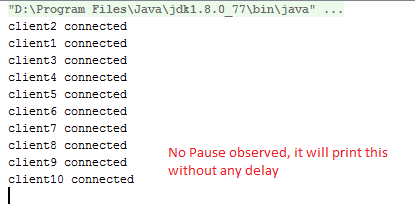
Here we can see that all 10 clients get connected and received acknowledgement from server without any delay even though server has only 5 threads to process connections.
I will explain the reason very soon.
Server outcome:

As you can see even though server has 5 threads only to handle client connection ,still it allows 10 client connection at a time. After that a long pause , as all client takes 15 seconds delay to send processing data . The key thing is server threads are not blocked and do not wait for any data from client. They will process it once it is available and mean while they can handle other client connections. This is the key aspect of NIO performance benefit over OIO.
 @Override
    public void channelRead0(ChannelHandlerContext ctx, String msg) throws Exception {
     if (!msg.contains("Data")) { // if client sends its name
      System.out.println(msg + " connected"); // print on console
      ctx.writeAndFlush(msg + " connected" + "\n"); //sending back acknowledgement to client
     } else { // if client sends some data for processing
      System.out.println(msg + " Processed by server"); // print on console
     }
    }
Above method does not block server threads and do not wait for any data from client. It will be asynchronously called when ever any data is available from client. Till that time it can utilize the same server threads for some completely different client connections.
In this article I have talked about NIO benefit on server side but similar thing you can think for client side also.
Now imagine a scenario of client server application where there are thousands of client concurrently accessing server and both of them have chain of operations like reading data from user, writing data in DB, calculate some business logic. Imagine if all the time server and client threads remains blocked than client can see significant delay in response from server and can not resume some other work till the time it receives outcome from response while on server side even though threads are idle and waiting for some data from client so they can not be utilized for other clients.
NIO is must and extremely powerful tool for high performance network applications.
I hope I am correctly able to make my point in this article.
Please post your comments and doubts!!!


